

Your Stall Now Has Its Own QR Poster
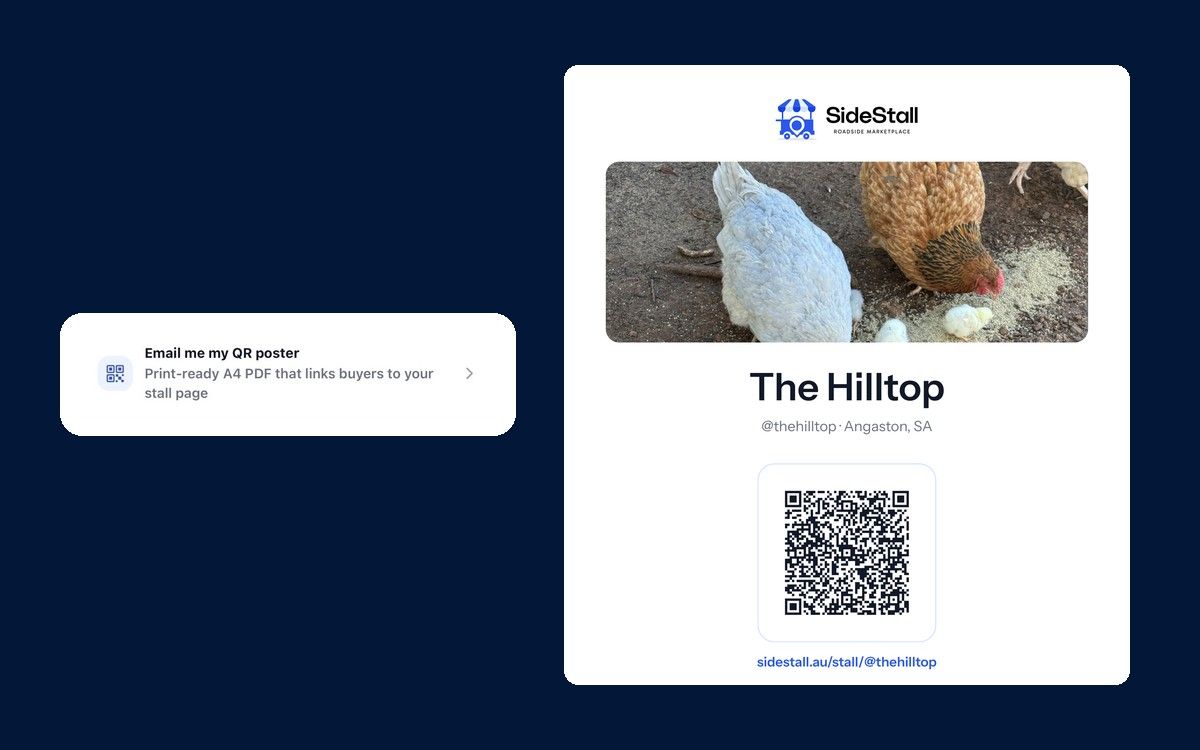
Tap one button in the SideStall app and we’ll email you a print-ready A4 poster with a QR code that takes buyers straight to your stall page.
A while back we wrote about a QR code for your gate. It got people the app, but once they had it they still had to type in your @handle to find your stall. And you had to email us to get one.
Now there’s a button for it in the app. Tap it and we’ll email you a QR poster made for your stall, and whoever scans it lands right on your stall page.
What’s on the poster
Your stall’s name, your @handle, a big QR code, and your stall page address printed underneath it, so anyone who’d rather type it in can.
On your stall page, people can see what’s on the table and grab the app to follow you. You can see where mine goes: The Hilltop at Angaston.
How to get yours
In the SideStall app, go to Manage stall and scroll down to Email me my QR poster. Tap it, and a print-ready A4 PDF lands in your inbox.
If you can’t find it, email hello@sidestall.au and we’ll help you track it down.
Putting it up
Plain A4 paper does the job. If it’s going outside, laminate it or slip it into a plastic sleeve.
The old advice still holds. Keep it at eye height with clear space around it, and scan it once with your own phone before you nail it to a post.
Stick it on the gate, the honesty box or the market table. If you put one up, send a photo to hello@sidestall.au. I’d love to see where they end up.
Not on SideStall yet?
Setting up a stall is free, and once it’s live, your poster is one tap away. Here’s how to get started.